
Προγραμματισμός Web εφαρμογών με Spring Boot – Μέρος 3o

Έχοντας ξεμπερδέψει με τη θεωρία, σήμερα θα δούμε ένα πρακτικό επεισόδιο.

Θα φτιάξουμε μια μικρή εφαρμογή Todo list, δεν θα επικεντρωθούμε στην ωραιοποίηση της σελίδας αλλά στην εξερεύνηση μιας προηγμένης χρήσης του Spring Boot, τη χρήση των drivers για σύνδεση στη βάση δεδομένων.  

Η βάση που θα χρησιμοποιήσω κατά τη διάρκεια του βίντεο είναι η MySQL, είναι μια πολύ γνωστή βάση και χρησιμοποιείτε από πάρα πολλές εταιρίες και ιδιώτες που αναπτύσσουν διαφόρων ειδών εφαρμογές.

Για εργαλείο σχεδιασμού και διαχείρισης της βάσης θα χρησιμοποιήσω το MySQL Workbench.  

Όπως θα παρακολουθήσετε και στο βίντεο θα φτιάξουμε με τη χρήση του εργαλείου MySQLWorkbench μια νέα βάση και θα προσθέσουμε ένα χρήστη.

Στη συνέχεια θα χρησιμοποιήσουμε το eclipse για να φτιάξουμε ένα νέο έργο Spring Boot τα βήματα είναι αναλυτικά στο βίντεο.

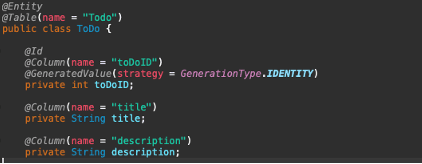
Για να μπορεί να φτιάξει τους πίνακες στη βάση δεδομένων θα ορίσουμε μια κλάση (class) όπου θα ορίσουμε όλα τα πεδία που χρειαζόμαστε. 
Θα προσθέσουμε στο POM αρχείο μας το dependency JPA (Java Persistence API).

Θα συνεχίσουμε με την προσθήκη των ρυθμίσεων του application.properties.  Όπως μπορείτε να δείτε πιο κάτω το Spring Boot με πολύ απλές ρυθμίσεις αναλαμβάνει τις πιο σύνθετες λειτουργίες και μας διευκολύνει, πχ δεν χρειάζεται να φτιάξουμε connection strings.  

Στην πιο πάνω εικόνα μπορούμε να δούμε και ορισμένες επιπρόσθετες ρυθμίσεις, όπως την εντολή για την εκτέλεση DDL (Data Definition Language) εντολών από το ORM (Object Relation Mapper) πακέτο.
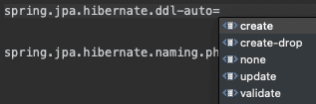
Στο βίντεο συζητάμε και τις διάφορες επιλογές που μπορούμε να εκτελέσουμε.

Επίσης θα συζητήσουμε και τη χρήση του πιο πάνω, που δίνει εντολή στο JPA, να ακολουθεί την ονομασία που εμείς καθορίζουμε.

Γιατί όμως πρέπει να καθορίζουμε εμείς το όνομα του πίνακα και το όνομα των πεδίων;

Παρότι παρέχεται η δυνατότητα αυτόματης δημιουργίας ονομάτων πινάκων και πεδίων, η πρακτική αυτή αποθαρρύνεται λόγω των ενδεχόμενων προβλημάτων συμβατότητας μεταξύ διαφορετικών βάσεων δεδομένων, της δυσκολίας συντήρησης του κώδικα και της απώλειας ελέγχου στην δομή της βάσης δεδομένων.

Αναλυτικά στο βίντεο φτιάξαμε 

  • Διάφορες οθόνες με τη χρήση html αρχείων
  • Διαδικασία που εισάγει δεδομένα κατά την εκκίνηση της εφαρμογής με τη χρήση του command line runner, με χαρακτηριστικό annotation @Component
  • Χρήση του repository, διαμεσολαβητή εφαρμογής και βάσης δεδομένων με τη χρήση JPA
  • Κλάση με χαρακτηριστικό annotation @Entity
  • Ορισμός και χρήση μεταβλητής repository με χαρακτηριστικό annotation @Autowired
  • Ορισμός και χρήση του Controller με το αντίστοιχο annotation
    • Πάντρεμα http requests με τις αντίστοιχες οθόνες.
    • @GetMapping
    • @PostMapping
    • Ορισμός και χρήση
      • Map<T>, για ανάκτηση των request parameters
      • Optional<T>, για ανάκτηση δεδομένων από το repository όπου υπάρχει ασάφεια εάν υπάρχουν δεδομένα ή όχι (null)
  • Χρήση του repository για:
    • Ανάκτηση εγγραφών
    • Δημιουργία καινούργιας εγγραφής
    • Επεξεργασία εγγραφής 
    • Διαγραφή εγγραφής
  • Χρήση του Model And View για μεταφορά δεδομένων από τον controller στα html αρχεία
  • Χρήση του @PathVariable στις μεθόδους που καθορίσαμε
  • Χρήση του thymeleaf για παρουσίαση δεδομένων στην οθόνη, με τεχνικές όπως τα th:each, το th:textth:value και th:href
  • Χρήση του thymeleaf χαρακτηριστικού @ που συνδυάζει το URL του server μας μαζί με ένα endpoint που ορίζουμε

Αφήστε ένα Σχόλιο

Η ηλ. διεύθυνση σας δεν δημοσιεύεται. Τα υποχρεωτικά πεδία σημειώνονται με *

We use cookies to personalise content and ads, to provide social media features and to analyse our traffic. We also share information about your use of our site with our social media, advertising and analytics partners. View more
Cookies settings
Accept
Decline
Privacy & Cookie policy
Privacy & Cookies policy
Cookie name Active

Who we are

Our website address is: http://stavrosbyte.eu.

Comments

When visitors leave comments on the site we collect the data shown in the comments form, and also the visitor’s IP address and browser user agent string to help spam detection. An anonymized string created from your email address (also called a hash) may be provided to the Gravatar service to see if you are using it. The Gravatar service privacy policy is available here: https://automattic.com/privacy/. After approval of your comment, your profile picture is visible to the public in the context of your comment.

Media

If you upload images to the website, you should avoid uploading images with embedded location data (EXIF GPS) included. Visitors to the website can download and extract any location data from images on the website.

Cookies

If you leave a comment on our site you may opt-in to saving your name, email address and website in cookies. These are for your convenience so that you do not have to fill in your details again when you leave another comment. These cookies will last for one year. If you visit our login page, we will set a temporary cookie to determine if your browser accepts cookies. This cookie contains no personal data and is discarded when you close your browser. When you log in, we will also set up several cookies to save your login information and your screen display choices. Login cookies last for two days, and screen options cookies last for a year. If you select "Remember Me", your login will persist for two weeks. If you log out of your account, the login cookies will be removed. If you edit or publish an article, an additional cookie will be saved in your browser. This cookie includes no personal data and simply indicates the post ID of the article you just edited. It expires after 1 day.

Embedded content from other websites

Articles on this site may include embedded content (e.g. videos, images, articles, etc.). Embedded content from other websites behaves in the exact same way as if the visitor has visited the other website. These websites may collect data about you, use cookies, embed additional third-party tracking, and monitor your interaction with that embedded content, including tracking your interaction with the embedded content if you have an account and are logged in to that website.

Who we share your data with

If you request a password reset, your IP address will be included in the reset email.

How long we retain your data

If you leave a comment, the comment and its metadata are retained indefinitely. This is so we can recognize and approve any follow-up comments automatically instead of holding them in a moderation queue. For users that register on our website (if any), we also store the personal information they provide in their user profile. All users can see, edit, or delete their personal information at any time (except they cannot change their username). Website administrators can also see and edit that information.

What rights you have over your data

If you have an account on this site, or have left comments, you can request to receive an exported file of the personal data we hold about you, including any data you have provided to us. You can also request that we erase any personal data we hold about you. This does not include any data we are obliged to keep for administrative, legal, or security purposes.

Where your data is sent

Visitor comments may be checked through an automated spam detection service.
Save settings
Cookies settings